How It Works
Send it anything. HouseFacts takes it from there.
There are three ways in: forward an email, upload a document, or snap a photo. Whichever door you use, HouseFacts reads what you sent, files it as a record connected to your home, and starts watching for what matters next.
Start Your Free 14-Day TrialFree for 14 days. No credit card required.



01
Forward it
Every home gets its own private email address that only you know. Forward the plumber's invoice, the warranty confirmation, or the utility bill, and whole emails count too, not just attachments.
No logging in, no forms. Mail from a sender your home hasn't seen before waits in the Smart Inbox for a one-tap approval, so spam never touches your records. See how Smart Forwarding works, or read the guide to turning your email into your home's filing system.


02
Upload it
Your inspection report already describes your whole house: the appliances, the systems, the things worth watching. Upload it once and HouseFacts pulls out what matters, catalogs your appliances, and turns the inspector's notes into recommended tasks you can schedule.
One report. Your whole home profile.
It is the setup step that folder-and-spreadsheet systems never survive long enough to reach. Here's why home trackers usually die around month four.
03
Snap it
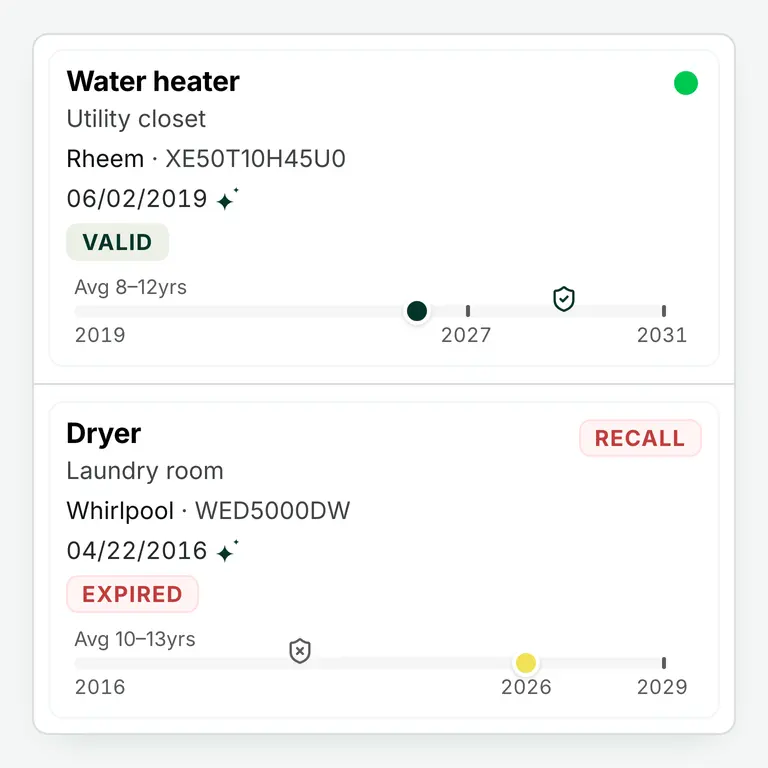
Photograph the label on your furnace, water heater, or dishwasher. HouseFacts reads the make, model, and serial number, decodes the manufacture date, and fills in the rest: the appliance's age, its expected lifespan, recall status, and any rebates that apply; add your warranty and it tracks that too.
That one photo is what keeps Appliance Intelligence watching on your behalf. Curious what it catches? Here's how to check your appliances for recalls.
What HouseFacts notices
Filing is only half the point. Once something is in your record, HouseFacts keeps watch, and every one of these runs live in the platform today.
Maintenance reminders
The furnace filter, the gutters, the water heater flush. Timed to your home and its systems, not a generic checklist.
Recall flags
Your appliances are checked against recall data over time, so a recall issued years after your purchase still reaches you.
Lifespan warnings
When an appliance nears the end of its expected life, you hear about it early enough to plan a replacement instead of surviving one.
Rebate offers
When a rebate applies to something you own, or to the replacement you are about to buy, HouseFacts surfaces it.
Where it all lands
Everything you send becomes a searchable Smart Record with the cost, the contact, and the paperwork in one place, and your contacts carry their full service history alongside it. When the dishwasher acts up, the receipt, the warranty, and the technician who fixed it are one search away, with nothing lost in a lonely folder.
And the record quietly pays for itself. The documented history of what you spent and improved builds your home's cost basis, the paper trail that matters at insurance time and again when you sell. See how the records pay off.
Frequently Asked Questions
Do I have to set everything up at once?
No. Most people start with one thing: a forwarded receipt, an inspection report, or a photo of the water heater label. Each one adds to your home's record on its own, and the picture fills in as you go. There is no big setup project waiting for you.
What file types can I send?
Emails with or without attachments, PDFs like inspection reports and invoices, and photos of appliance labels or documents. Forward it, upload it, or snap it from your phone. HouseFacts reads whole emails too, so a quote written in the body of a message counts as much as the PDF.
How accurate is the reading?
Very good, and improving. HouseFacts members regularly tell us the details pulled from their inspection reports and appliance labels surprised them, including things they did not know about their own home. Every record shows you what was read, so nothing is hidden behind the scenes.
What if it gets something wrong?
Every record stays editable. If a model number or a date comes through wrong, you can fix it in a couple of taps, and the correction carries through to reminders, warranty tracking, and cost history. Mail from an unknown sender also waits in the Smart Inbox for your approval first, so nothing lands without you.
Start With One Email, One Report, or One Photo
Pick whichever is closest at hand. HouseFacts takes it from there. Free for 14 days. No credit card required.