The Digital Home Advantage: How Going Paperless Protects Your Property
 Elizabeth KiselevNovember 13, 20256 min read
Most homeowners still manage their biggest asset like it’s 1995: stacks of paper warranties in a kitchen drawer, paint swatches taped to a wall, sticky notes with “plumber’s number” fading in the sun.
It works until it doesn’t.
Then a moment comes when you need those documents fast: an appliance breaks, a storm hits, or a claim lands on your desk, and the paperwork you need is never where you left it. When that happens, you need your home information in one place. That’s where going digital helps.
The Problem With the “Paper Pile” Era
Keeping your home’s information scattered across folders, drawers, and random notes creates risk in three big ways:
- Accessibility: In a moment of urgency, a burst pipe, you don’t have time to dig through stacks of paper or remember which contractor did the last repair.
- Security: Paper is vulnerable to loss, water damage, fire, or even pests.
- Efficiency: Disorganization slows down everything from basic maintenance to insurance claims to selling your home.
Your home is a complex ecosystem of insurance policies, maintenance schedules, receipts, and contractor contacts. It deserves a system that can keep up with your life.
The Digital Home Advantage
1. Instant Access, Anywhere
Imagine this: you’re halfway across the country and your housesitter calls: there’s an issue with the water heater. Instead of guessing or giving vague instructions, you open your phone, search your digital binder, and instantly send them the warranty info, installer’s contact, and model details. Problem solved before it escalates.
When your home’s details are digitized, you can:
- Access them from any device.
- Share documents or images instantly with contractors, insurance adjusters, or family members.
- Avoid delays caused by misplaced paperwork.
2. Disaster-Proof Storage
Physical records are only as safe as the space they’re in. One roof leak or kitchen fire can wipe out years of important documentation. Going digital protects your records in the cloud so they’re safe no matter what happens to the physical home.
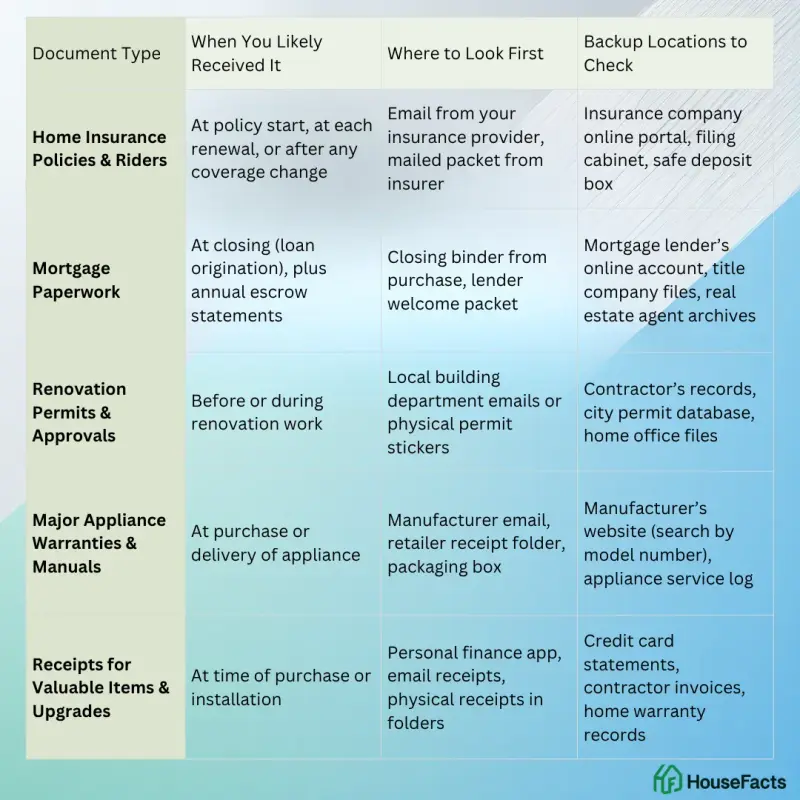
Key records to safeguard digitally:
- Home insurance policies and riders.
- Mortgage paperwork.
- Renovation permits and approvals.
- Major appliance warranties and manuals.
- Receipts for valuable items and upgrades.
Pro tip: Back up in more than one location (e.g., secure platform + desktop) for extra security.
3. Smarter Maintenance
The biggest costs for most homeowners don’t come from big emergencies; they come from small, preventable issues left unchecked. Going digital allows you to:
- Set recurring reminders for all of your main devices for seasonal tasks like gutter cleaning, HVAC servicing, or storm prep.
- Keep a service log with the date, contractor name, cost, and notes for every repair or upgrade.
- Track warranty expiration dates so you can make claims before coverage ends.
Over time, this becomes a complete maintenance history, not just helping you stay on top of upkeep, but also proving to future buyers or insurers that your home has been well cared for.
4. Proof When You File a Claim
When something goes wrong, documentation is what turns a claim into a payout. Adjusters base settlements on proof. If you can produce invoices and photos within minutes, you’re more likely to receive a fair and faster settlement. And that payoff repeats: your records earn their keep every year you own, for coverage reviews, warranty claims, and budget decisions, not only the day you sell.
- The resale bonus: When you do sell, a buyer can see every improvement with receipts, permits, and before-and-after photos, and your records already track your home’s cost basis so you can figure potential capital gains taxes accurately.
The “Invisible ROI” of a Digital Home
Beyond emergencies and major transactions, going digital makes the daily experience of living in and managing a home smoother and more efficient.
- You will not accidentally buy duplicate supplies or materials because you forgot you had them.
- You will save hours searching for paint colors, flooring details, or appliance model numbers when working on small projects or repairs.
- You can hand over everything easily to a housesitter, family member, service provider, or property manager without walking them through every detail in person.
Most of us buy homes with the intention of living in them for years, even decades. Over time, this means a growing list of repairs, upgrades, and important documents. Keeping everything organized digitally not only makes your own life easier but also sets you up for smoother transitions if you eventually need help managing the property.
Whether that help comes from loved ones stepping in during a busy season of life or a professional property manager taking over day-to-day responsibilities, having a digital record ensures they can hit the ground running with full knowledge of your home’s history, systems, and needs. This saves time, prevents mistakes, and protects the value of your home: all benefits that add up quietly over the years.
What Your Records Actually Hold
A plain spreadsheet holds exactly what you type into it, and nothing more. The records inside HouseFacts carry more than a row of text:
- Smart Forwarding reads a forwarded receipt, warranty, or invoice and captures the vendor, date, and amount, then files it under your home’s record. You forward the email; the details land in the right place instead of your inbox.
- Appliance Intelligence turns an appliance’s serial number into its manufacture date, its expected lifespan, and any active recalls, so you know how old a unit really is and whether it has been called back. Warranty status shows too, once you add it.
- Service logs stay with the appliance. Every repair or visit you record attaches to that specific unit, so each appliance keeps its own history instead of scattering across dated rows.
A spreadsheet cannot decode a serial number, flag a recall, or keep a repair tied to the machine it fixed. That is the difference between a list you keep updating and a record that carries its own detail.
How to Start Going Digital
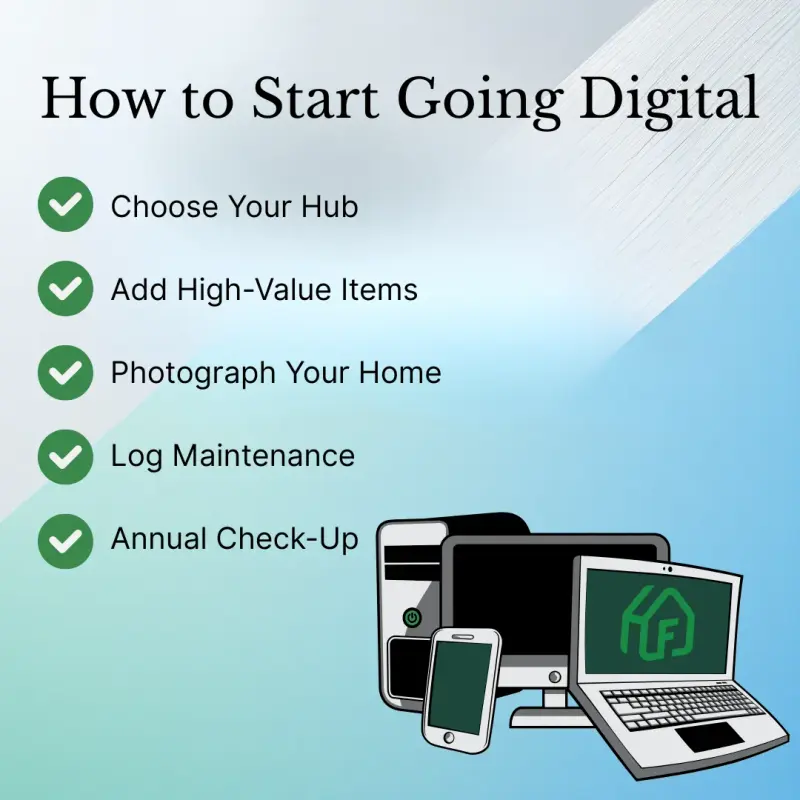
1. Choose Your Hub
Choose Your Hub: Use a platform or spreadsheet that’s simple to update. Our Digital Home Binder is pre-formatted and ready to customize for your property.
2. Start With High-Value Items
Add your insurance policies, mortgage documents, renovation permits, and big-ticket receipts first. These are the records most often needed for insurance claims, refinancing, or proving home value. Having them digitized means you can produce them quickly in an emergency or major transaction, without digging through piles of paper.
3. Photograph Your Home
Include wide shots of each room plus close-ups of valuables, appliances, and serial numbers. This creates a visual record that can help prove ownership and condition for insurance claims, assist with resale listings, and make it easier to match replacement parts or finishes in future repairs. Photos also provide peace of mind, knowing you have a clear record of your home’s contents and features at a specific point in time.
4. Create Maintenance Logs
Record what work was done, when, by whom, and for how much. Stay consistent by using our 2026 Maintenance Calendar with suggested seasonal tasks already built in.
5. Set an Annual “Digital Check-Up”
Update your records once a year, after tax season or during a quiet month, to keep everything current.
The Bottom Line
Your home already has a street address. Now it should have one organized place online where all of its important information lives. Going digital means you are not just getting organized. You are protecting your investment, increasing its value, and making your life easier every day.
Start simple with our free Digital Home Binder and 2026 Maintenance Calendar. Both are fully editable and designed to help you organize your home’s records and keep track of seasonal maintenance tasks all year.
When you are ready to save even more time, HouseFacts takes your home organization to the next level. Forward a receipt, warranty, or invoice and Smart Forwarding captures details like vendor, date, and amount for you, filing it under your home's record. Upload documents, photos, and maintenance logs, and keep everything organized in one secure, searchable spot. Whether you are filing a claim, planning a remodel, or preparing to sell, your home’s history is ready whenever you need it.
Keep reading
 organizationmaintenance
The 10 Numbers Every Homeowner Should Have Saved Before a Crisis Hits
Don't wait for a burst pipe or a midnight lockout to realize you're unprepared. Here are the 10 essential contacts every homeowner needs saved before an emergency strikes, plus a free printable template.
 organizationmaintenance
The Room-by-Room Spring Cleaning Checklist for Homeowners: Protect Your Home's Value
Spring cleaning goes beyond tidying up. Use this room-by-room home maintenance checklist to protect your home's value and catch costly repairs before they happen.
 organizationhousefacts
Beyond Checklists: How Premium Property Management Tools Let Your Second Home Thrive, Even When You’re Not There
Second homes come with double the maintenance and double the paperwork. Here’s how the right property management tools keep yours protected while you’re away.